
The best USB Type-C hubs can maximize the available ports on your laptop, unlocking a ton of further potential for your device. Not only will these hubs expand on your port selection, but many also afford impressive power delivery throughput to keep your devices charged up all day long.
A docking station is a fantastic option if you're looking to build up a workstation around your laptop, but a hub is better for those minimalist setups that need just a few extra ports on hand to get the job done.
Wondering about the difference between these two devices? Then check out our explainer on the difference between a USB-C hub and a docking station.
Whether you're looking for a better typing experience, more fluid control of your device, or a way to expand on your machine's I/O offerings, we have our selection of the best keyboards, best mouse, and best docking stations.
However, sometimes all you need is a little portable port-pep in your step, and for that, we've drawn up our list of the best USB Type-C hubs you can get your hands on right now.
Best USB Type-C hubs to buy today
Why you can trust Laptop Mag Our expert reviewers spend hours testing and comparing products and services so you can choose the best for you. Find out more about how we test.

As far as USB-C hubs go, the EZQuest Multimedia Hub is the best out there. With a competitive price, all the right ports to manage extra PC peripherals and storage devices, the added perk of 100W passthrough power delivery, and compatibility with virtually every platform, this sleek and travel-friendly hub will get the job done.
While its lack of support for 60Hz on external displays and Thunderbolt 4 connectivity make this a device more suited for professionals and casual consumers, it still offers incredible versatility that any laptop user can make the most out of. If you’re looking for a USB-C hub that will act as a faithful companion to your work setup, the EZQuest Multimedia Hub is a no-brainer.
See our full EZQuest USB-C Multimedia Hub review

Plugable is known to deliver quality USB-C hubs and docking stations, but its USB-C 7-in-1 Hub knocks it out of the park. At its price and the number of different ports and features it sports, this USB-C hub is a steal.
With three USB 3.0 ports with 5Gbps transfer speeds, HDMI 1.4 connectivity, which can support 4K resolution at 30Hz, and two SD card readers, there’s not much else a laptop user who is on the move will need. It’s a shame the USB-C 87W pass-through charging is dodgy, but there are many laptops with a separate power supply for charging, anyway.
See our full Plugable USB-C 7-in-1 Hub review

The Kensington G1000P USB-C Mini Dock is a portable pocket rocket that can expand the potential of some of the best Chromebooks, MacBooks, and Windows laptops that have sacrificed their ports for a sleek design. It may not be the flashiest USB-C hub around, but it doesn’t need to be when its compact form factor and reliable selection of ports can give your ultraportable laptop the connectivity it needs.
With its pocketable, compact design and some heavy-duty USB-A 3.2 Gen 1 ports, Kensington’s G1000P USB-C Mini Dock fills the gap between needing more ports and not having to lug around a hefty docking station. But not too many more ports. While its hybrid USB-C hub capabilities of delivering 85W charging and lightweight form factor are useful, an extra port of two ports would have made this Mini Dock go the distance.
Still, for Windows laptops, MacBook, and Chromebook users who only need a couple of reliable ports, this makes it onto our list of best USB-C hubs.
See our full Kensington G1000P USB-C Mini Dock review

It’s unfair to call Targus’ USB-C Dual 4K Docking Station an actual “docking station,” as it doesn’t have nearly enough ports to contend with those formidable accessories. But I can see why Targus has called it one. It boasts 100W Power Delivery and two HDMI 2.0 inputs with 4K capabilities at 60Hz — that’s not something many USB-C hubs can do.
MacBook Air or Dell XPS 13 owners are due an awakening for port expansion, but any laptop user will get a kick out of how simple yet handy Targus’ dock can be in most circumstances.
The USB-C Dual 4K Docking Station is a hybrid USB-C hub in disguise. It could have benefited from an extra USB-A port (as well as better port management), but it’s still an incredibly handy accessory that any laptop and tablet user will get great use out of.
See our full Targus USB-C Dual HDMI 4K Docking Station review

The Kensington SD1650P USB-C Single 4K Portable Docking Station is the “something more” that owners of multiple devices should be interested in. Not only does the hybrid dock charge your Windows laptop with impressive 100W pass-through power while adding several ports, but it can also do the same for a MacBook, iPad, and even an Android tablet. If it supports USB-C connectivity, Kensington’s dock will, more likely than not, work like a charm.
The SD1650P Portable Docking Station’s compatibility is hard to beat, and since it can work off a device’s power supply without needing a power adapter (you’ll lose the 100W power pass through), the device is a fantastic choice for travelling professionals. The ability to immediately give virtually all your devices extra ports, video output options, and a power supply using one USB-C port makes this hybrid portable dock one of the best USB-C hubs on the market, especially for MacBook users.
It’s a shame the price and limited selection of ports lets the SD1650P Portable Docking Station down, especially when other hubs are significantly more affordable. For those in need of a highly versatile device, the dock is worth your hard-earned cash, especially with its 100W pass-through power, which rivals even pricier docking stations.
See our full Kensington SD1650P USB-C 4K Portable Docking Station review

The Kensington SD1600P USB-C Mobile Dock is unique as it acts as a viable docking station and an excellent USB-C hub for laptop users on the move. Its USB-C passthrough power supply and additional ports will free up all your other laptop inputs while charging your laptop and any other devices connected to it. Don’t need a power supply? That’s fine, as it can also be powered by your laptop.
While Kensington labels the SD1600P USB-C Mobile Dock as a docking station on the device’s listing page, it also claims it can use a laptop’s battery when traveling — which is, by the company’s definition, a USB-C hub. In truth, it simply brings the best of both worlds. If you can excuse the awkward port placement and don’t have a 16-inch MacBook Pro (2020), this mobile dock is a solid purchase for traveling professionals.
See our full Kensington SD1600P USB-C Mobile Dock review
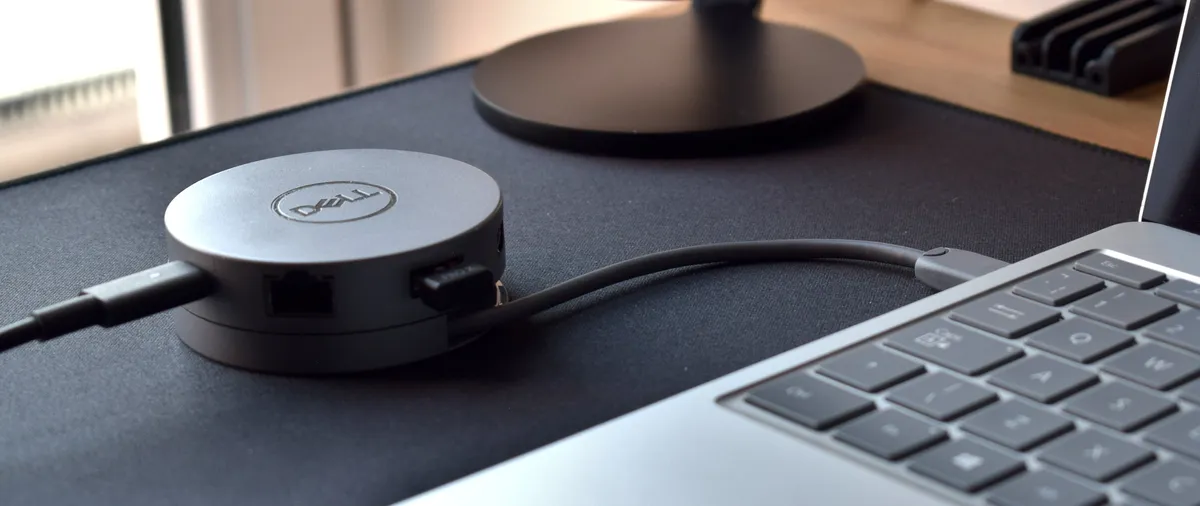
Ultra-portable and ultra-powerful, the Dell USB-C Mobile Adapter is a USB-C hub that exchanges one port for a variety of seven more, including HDMI, DisplayPort, Type-C, and Type-A USB ports, and a speedy 1Gbps Ethernet port.
The Mobile Adapter can also deliver up to 90W of Power Delivery and transmit data at solid rates, but it is a little pricey, and doesn't do cable management very well.
While you're shopping for Dell, why not check out some of the best Dell laptop deals right now?
See our full Dell USB-C Mobile Adapter (DA310) review.

It's easy to see why this is a best-seller on Amazon. Pass-through charging, SD card readers, three USB 3.0 ports, and HDMI output mean it has everything we look for in a Type-C hub. But unless you want those card readers, you're better off saving $25 and buying Aukey's squarish-puck hub, which packs one more USB 3.0 port.

The Elgato Thunderbolt 3 Mini Dock has four ports: one USB 3.1 port, an HDMI port, a DisplayPort, and an RJ45 Ethernet port, which all functioned correctly. This dock allows you to enjoy fast Thunderbolt speeds and the luxury of two 4K extended displays, and it also has a slim design with a convenient tuck-away wire.
However, the dock isn’t compatible with USB Type-C, so it’ll only connect to a Thunderbolt 3 port, and it doesn’t have a Type-C connector to replace the one that it’s taking up.
The Elgato Thunderbolt Dock Utility app that it does offer is available for only macOS (it allows you to disconnect all storage devices at once and tells you when it's safe to disconnect the dock itself).
It’s a little pricey for $149 (even when it’s on sale for $99), but overall, the Elgato Thunderbolt 3 Mini Dock is a solid choice if you’re interested in connecting to high-resolution displays.
USB-C: What you need to know
USB Type-C has plenty of perks, and with one of the USB Type-C hubs you might be considering getting, you'll be able to copy files at USB 3.1 speeds or faster, deliver enough power to charge a laptop, or use Alt Mode to send other types of data using DisplayPort or Thunderbolt 3 or Thunderbolt 4 connections.
Essentially, it's a tiny, super-fast connector that many of the best laptops today have a connector for, with the only downside being that USB-A or USB-B connectors can't be used with a USB Type-C port (that's where a USB Type-C hub comes in handy).
However, there are USB-C accessories and cables that make charging and transferring data even better for the best laptops, and best tablets on the market. Better yet, they don't have to be too pricey, either.

